Showing posts with label Finance. Show all posts

How to pay your Cebu Pacific flights via Metrobank online

0 comments
It is almost the same with how you pay through BDO Online Banking.

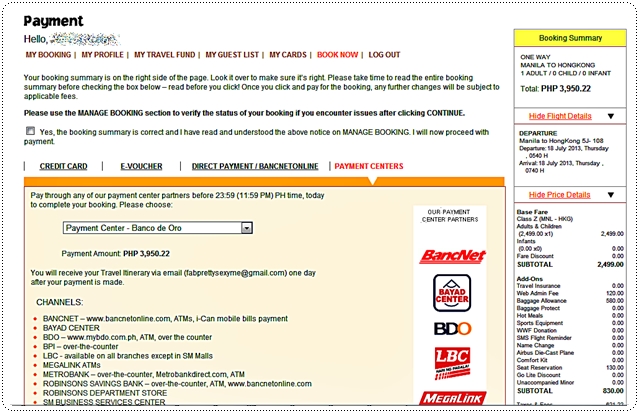
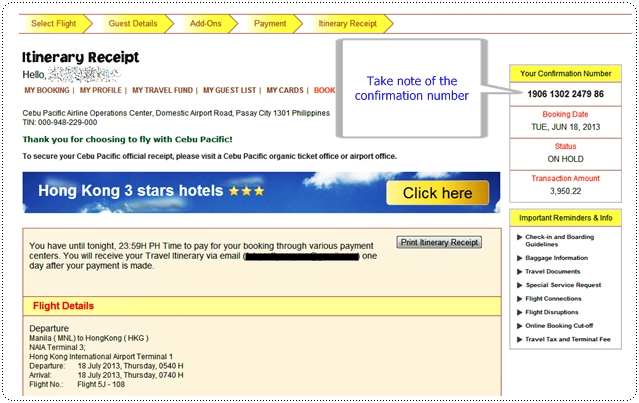
But with the new website, you just have to choose Payment Centers, as seen below. You will be taken onto the next page with your confirmation or booking number.


Take note of this booking number.

 Go to your Metrobank Direct website. If you do not have one yet, please go to your branch of account to sign up. Online activation may take up to 3-5 banking days. Please call your bank for more details.

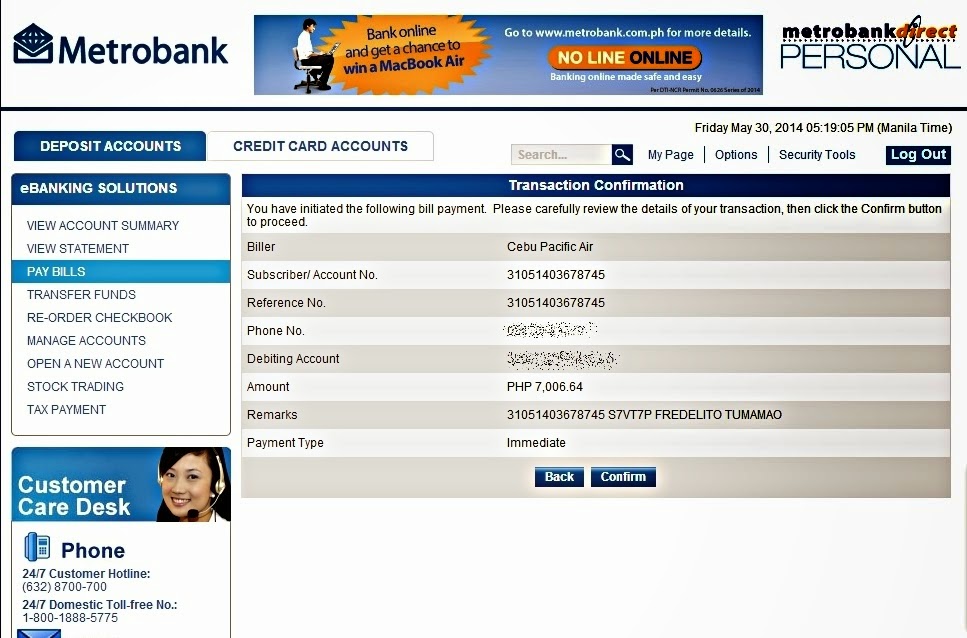
From your online banking, just select Pay Bills from the menu. Under Special Biller, select Others, then select Cebu Pacific as shown below. Fill up the necessary details. Please make sure you have your correct booking number.


After you hit the button "Continue", you will be taken to the confirmation page already. And voila, you're done. Just wait for the confirmed flight e-ticket in your registered email after 24 hours.

Below is a sample confirmation page taken from a previous booking. Once you hit confirm, you will be asked to input your transaction password, and you're done.


Read More »

How to cash out your Google Adsense earnings via Western Union Quick Pay?

0 comments
First and foremost, you will have to choose Western Union Quick Pay as your form of payment at your Google Adsense account. To do this, please follow the steps below.

To choose or change your form of payment, follow these steps.
  • Sign in to your account.
  • Visit the Account settings page.
  • In the Payment settings section, click "edit payment method."
  • Choose the radio button for your preferred form of payment and click Continue.
  • Follow any additional instructions to choose your form of payment, and save your changes.

Please be aware that you won't be able to select a form of payment if your earnings haven't reached the payment method selection threshold. Your earnings will be released once you reached USD 100.

To cash out, just go to the nearest Western Union branch where they have Quick Pay service. To check if there's one near you, visit http://www.payment-solutions.com/agent.asp to find a Western Union Agent located in the country where your payments are sent.

Your Western Union Quick Cash payment will be made in US dollars. However, at most Western Union Agent locations, you may have the option to receive your payment in your local currency. Conversion rates will be calculated according to the rate used by the Western Union Agent on the day you pick up your payment.

Bring the a valid government-issued photo ID (Passport, Driver's license, etc) and the sender's information to pick up your payment, so please make sure that your AdSense account payee name exactly matches that of your ID. The senders information is also required. Just print your Statement of Earnings so you won't forget what to bring with you when you go to Western Union. It looks like this:


Read More »

Paying with your credit card through Paypal

0 comments
I have an online travel agency and though I prefer to be paid in cash, there are a lot of clients who wants to pay using their credit card. It's too risky to be accepting credit card payments through bank terminals due to rampant fraudulent transactions so Paypal for me is the best and secure way.

Signing Up

It is very easy to sign up. Just go to Paypal's website. Choose any of the 3 category. As for us, business account of course.


The next page after will ask for your information so kindly fill it up accordingly, and the very important thing you should be mindful of is linking your credit card.


Read More »

Buying US Dollars in BDO

First and foremost, you can only buy US dollars or any foreign currencies at your BDO branch of account. They won't sell foreign currency to you if you don't have a BDO account with them.


You need to bring your passport, a photocopy of it and your TIN to complete the transaction. For large amounts, it is better to have the dollars reserved a day prior to your visit. There's no need to bring your round trip plane ticket, your passport will do.

I am used to buying foreign currencies for travel at Czarina. But I find the rates of BDO today very competitive. I still use Czarina from time to time. It's a highly recommended money exchange company and it just so happen that they have 2 branches near where I live. Spell convenience.

You can check the daily money exchange rates of BDO on their website https://www.bdo.com.ph and check Czarina's rate at http://www.czarinaforex.com/.


Read More »

How to pay your Cebu Pacific flights via BDO Online Banking

I am a sucker for anything convenient. And I am definitely a fan of online banking. Just recently, I swore not to use my credit card anymore for flight bookings. I decided to pay in cash. Good thing, it's so convenient to pay using BDO's online banking.

So after you're done with the booking details and have reached the payment page, choose "Payment Centers", then you will see that the first option in the drop box is Banco de Oro. Then, just hit "Continue".


You will be taken to the next page, and you must take note of your Confirmation Number.


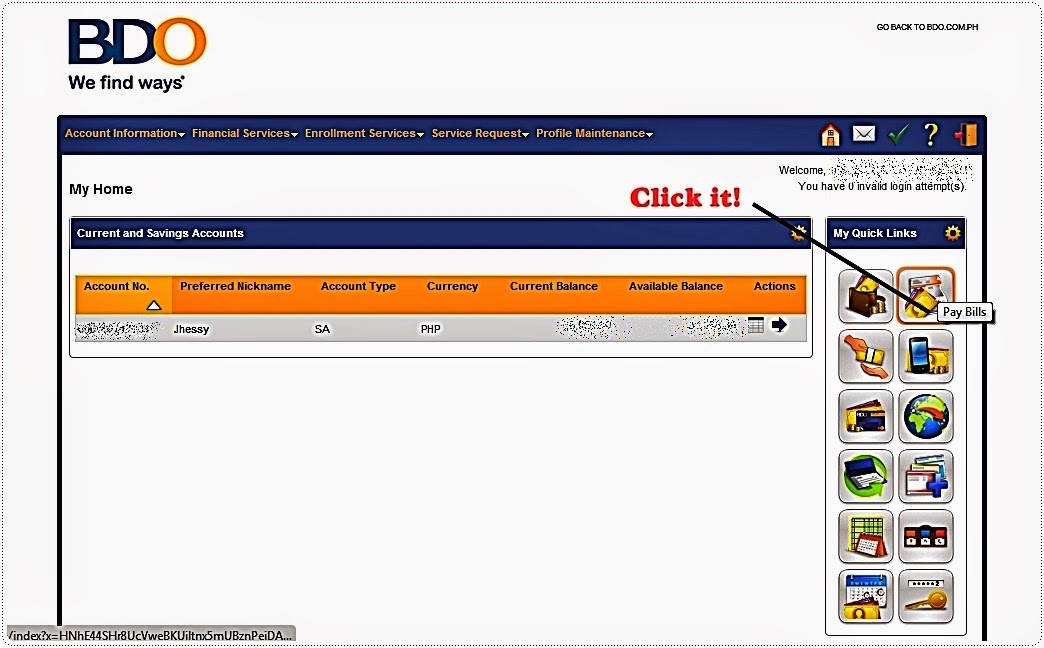
The booking will be on hold until 11:59 PM of the same day. Next, forward your payment by going to Pay Bills on your BDO Online banking account.


Be sure to click "Show Company/Biller not requiring enrollment", then select "Cebu Pacific Air Inc.". Put all the necessary information and you're good to go after clicking "Submit". You will then be taken to a new page stating that you have successfully forwarded your payment.


Your itinerary will be sent to your email address the following morning. In my case, I received it around 8AM.

Cool, right? Fast and easy. Perfect to those who doesn't have credit cards as well. Check Cebu Pacific's other Payment Option here! 

or check the list of Payment Centers here

cebu pacific payment centers


Read More »